A free DVIR form template with all 11 parts the federal rule requires and all three sign-offs. Its log flags any truck that can’t roll yet. Prints on one page. Google Sheet, PDF or Excel.
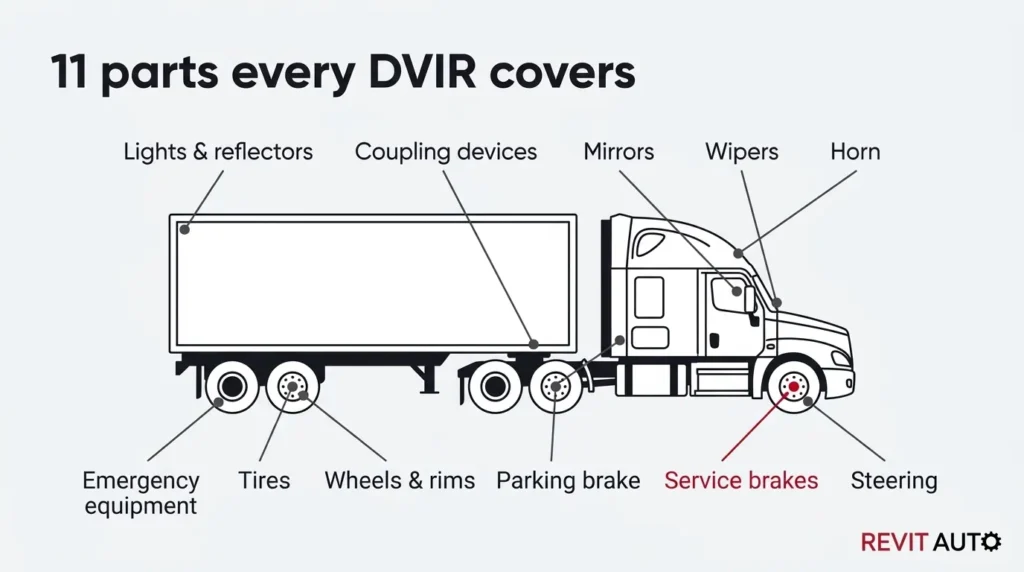
The form covers the 11 parts listed in the federal DVIR rule, word for word.
They are service brakes and trailer brake connections, parking brake, steering, lights and reflectors, tires and the horn. Then wipers, mirrors, coupling devices, wheels and rims, and emergency equipment.
1. Print the PDF for the cab, or keep it electronically. Both are allowed.
2. One report per vehicle, for every vehicle a driver ran that day.
3. Mark each part OK or Defect, and describe any defect.
4. The mechanic or carrier certifies each defect as repaired, or as not needing repair, before the truck runs again.
5. The next driver reviews and signs before driving.
6. Log it and keep it for at least three months.
Your copy comes with a phone form for drivers. It takes about five minutes to set up.
1. Open your copy and wait a few seconds. A Revit DVIR menu appears at the top, after Help.
2. Go to the Settings tab. Type your unit numbers in the Unit numbers column. Add an alert email, or leave it blank to use yours.
3. Click Revit DVIR, then Create driver DVIR form.
4. Approve the permissions when Google asks (see the note below).
5. Send drivers the form link from the Settings tab. Each report lands on the DVIR log.
6. When a driver reports a defect, you get an email. Record the repair and the next driver’s sign-off on the DVIR log.
Added units later? Click Revit DVIR, then Refresh unit list on the form.
About the Google warning. The first time, Google asks for permission. Click Continue and pick your account. If you see “Google hasn’t verified this app”, click Advanced, then Go to … (unsafe), then Allow.
That warning shows for any script inside a personal copy. The script runs only in your copy, under your own Google account. You approve it once.
Need one DVIR every driver fills out the same way, with nothing missing in an audit.
A one-page list of the 11 parts, so the end-of-day report takes a few minutes.
See which trucks are on hold and which defects still need a sign-off, in one log.
We counted every roadside DVIR violation in DOT’s data from October 2023 to October 2026. 149 of the 152 were the same thing: no signature from the next driver.
That’s the step that gets skipped when a truck is in a hurry to roll out.
The form puts the next driver’s line right under the repair certification, so it’s hard to miss.
More on who signs and why, in our DVIR guide.
Yes. Enter your name and email, and you get a link to make your own copy, plus PDF and Excel versions.
Only when a defect is found or reported. Many fleets still file one every day so there’s a record either way.
Yes. The Revit DVIR menu builds a phone form for your units. Each report lands on the DVIR log, and a defect emails you to hold the truck.
Yes. Federal rules allow electronic DVIRs. Fleets that want an app can use Downtime Terminator, the fleet app Revit Auto makes.
At least three months from the date it was prepared, along with the repair certification and the next driver’s sign-off.
Carriers running a single commercial vehicle, driveaway-towaway operations, and private nonbusiness passenger carriers.
Our mobile mechanics fix DVIR defects at your yard across Maryland, DC and Northern Virginia, so the truck can roll again.
This resource explains federal and Maryland rules for general information. It isn’t legal advice. Confirm current requirements with FMCSA and the Maryland MVA.
202-827-5955
Damascus, MD 20872 US